
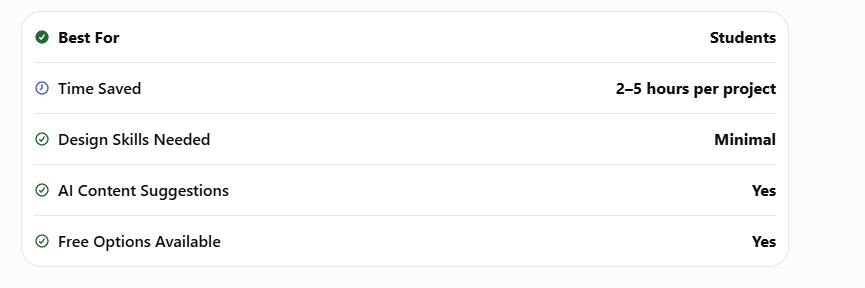
AI Presentation Tools for Students are becoming essential for school assignments, college projects, seminars, and online presentations. Instead of spending hours designing slides manually, students can now use AI-powered tools that automatically create layouts, suggest content, add visuals, and improve presentation quality.
In 2026, AI presentation software has advanced significantly. Many tools can generate an entire presentation from a simple topic prompt, helping students save time and focus more on learning.
This guide covers the 9 best AI presentation tools for students, including their features, pros, cons, pricing, and the best use cases.
Why Students Should Use AI Presentation Tools 
AI presentation tools offer several advantages:
- Save hours of slide design work
- Generate professional layouts automatically
- Add charts, icons, and visuals
- Create speaker notes
- Improve presentation structure
- Help beginners design better slides
- Support online and classroom presentations
1. Gamma
Best For: Instant AI-generated presentations
Official Website: https://gamma.app
Gamma can create an entire presentation from a single prompt. Students simply enter a topic, and the AI generates slide content, design, and structure automatically.
Key Features
- AI slide generation
- Professional templates
- Interactive presentations
- Easy sharing
Pros
- Extremely fast
- Modern designs
- Great for beginners
Cons
- Limited customization on free plan
2. Tome
Best For: Storytelling presentations
Official Website: https://tome.app
Tome focuses on creating visually engaging presentations with AI-generated narratives and layouts.
Key Features
- AI storytelling
- Image generation
- Responsive layouts
- Collaboration tools
Pros
- Excellent visuals
- Creative presentation style
Cons
- Less suitable for technical presentations
3. Beautiful.ai
Best For: Business-style presentations
Official Website: https://www.beautiful.ai
Beautiful.ai automatically adjusts slide layouts to maintain professional design standards.
Key Features
- Smart slide formatting
- Charts and graphs
- Team collaboration
- Brand consistency
Pros
- Clean professional designs
- Excellent for reports
Cons
- Fewer creative templates
4. Canva Magic Design
Best For: School and college projects
Official Website: https://www.canva.com
Canva’s AI features can generate presentation layouts, suggest designs, and create visual elements automatically.
Key Features
- AI design suggestions
- Thousands of templates
- Drag-and-drop editing
- Animation support
Pros
- Very easy to use
- Large template library
Cons
- Some premium templates require payment
5. Plus AI
Best For: Google Slides users
Official Website: https://www.plusdocs.com
Plus AI integrates directly with Google Slides and generates presentations from prompts.
Key Features
- Google Slides integration
- AI content generation
- Slide rewriting
- Template suggestions
Pros
- Works inside Google Slides
- Good for collaborative projects
Cons
- Requires Google account
6. Pitch
Best For: Group presentations
Official Website: https://pitch.com
Pitch offers strong collaboration features for team assignments and presentations.
Key Features
- Real-time collaboration
- AI slide suggestions
- Presentation analytics
- Modern templates
Pros
- Excellent for teams
- Fast editing
Cons
- Advanced features are paid
7. SlidesAI
Best For: Turning text into slides
Official Website: https://www.slidesai.io
SlidesAI converts written text into a complete presentation automatically.
Key Features
- Text-to-presentation
- AI formatting
- Multi-language support
- Google Slides integration
Pros
- Saves time
- Simple workflow
Cons
- Design options are limited
8. Presentations.AI
Best For: AI-first presentation creation
Official Website: https://www.presentations.ai
This platform is built specifically for AI-generated presentations with smart design automation.
Key Features
- AI slide generation
- Smart layouts
- Visual recommendations
- Cloud-based editing
Pros
- Strong AI capabilities
- Professional output
Cons
- Still evolving as a platform
9. Decktopus AI
Best For: Fast academic presentations
Official Website: https://www.decktopus.com
Decktopus can generate presentations quickly and includes speaker notes and presentation guidance.
Key Features
- AI slide creation
- Speaker notes
- Form integration
- Quick editing
Pros
- Very fast setup
- Useful presentation tips
Cons
- Free plan has restrictions
Comparison Table
| Tool | Free Plan | Best For |
|---|---|---|
| Gamma | Yes | Instant AI slides |
| Tome | Yes | Storytelling |
| Beautiful.ai | Limited | Professional reports |
| Canva | Yes | School projects |
| Plus AI | Trial | Google Slides |
| Pitch | Yes | Team collaboration |
| SlidesAI | Yes | Text-to-slides |
| Presentations.AI | Yes | AI-first design |
| Decktopus | Yes | Quick presentations |
How to Choose the Best AI Presentation Tools for Students 
Choosing the right AI Presentation Tools for Students depends on your academic needs, presentation style, and budget. While every AI tool offers automation, they are designed for different types of users.
If you need to create a classroom presentation quickly, tools like Gamma and Canva are excellent because they generate professional-looking slides with minimal effort. Students working on research projects may prefer Beautiful.ai or Presentations.AI because they provide polished layouts suitable for seminars and academic conferences.
If your school or college uses Google Workspace, Plus AI and SlidesAI integrate directly with Google Slides, making it easier to edit and collaborate with classmates. For group assignments, Pitch offers real-time collaboration so multiple students can work on the same presentation simultaneously.
Before selecting an AI presentation tool, consider these factors:
- Ease of use for beginners
- Availability of free features
- Compatibility with PowerPoint or Google Slides
- Collaboration options for group projects
- AI-generated content quality
- Export formats such as PDF and PPTX
Testing two or three tools before choosing one can help you find the platform that best matches your workflow.
Free vs Paid AI Presentation Tools
Many AI Presentation Tools for Students offer free plans that are sufficient for school and college assignments. Free versions usually include basic templates, AI-generated slides, and limited exports. They are a good starting point for students who want to improve their presentations without spending money.
Paid plans unlock advanced features such as premium templates, custom branding, unlimited AI generation, collaboration tools, analytics, and higher-quality exports. These features are especially useful for university students, educators, freelancers, and professionals who create presentations regularly.
For most students, starting with a free plan is the best approach. As your needs grow, you can decide whether the premium features justify the cost.
Tips to Create Better AI Presentations
Even the best AI Presentation Tools for Students cannot replace good presentation skills. AI helps with design and organization, but students should always review the generated content before presenting.
Here are a few practical tips:
- Keep each slide focused on one main idea.
- Use high-quality images and simple icons.
- Avoid paragraphs with too much text.
- Maintain consistent fonts and colors throughout the presentation.
- Practice your presentation aloud before class.
- Verify facts, statistics, and references generated by AI.
- Use charts and diagrams to explain complex concepts.
- End with a strong summary slide and invite questions from your audience.
These simple practices will make your AI-generated presentations more engaging, professional, and easier for your audience to understand.
Common Mistakes Students Make
- Using too much text on slides
- Ignoring readability
- Adding unnecessary animations
- Not checking factual accuracy
- Using inconsistent fonts and colors
https://studentaiincomehub.com/ai-pdf-tools-for-students/
https://studentaiincomehub.com/ai-chrome-extensions-for-students/
https://studentaiincomehub.com/study-faster-without-burnout/
https://studentaiincomehub.com/ai-tools-for-assignment-writing/
Final Verdict
AI Presentation Tools for Students can dramatically reduce the time needed to create school and college presentations. If you’re a beginner, Gamma and Canva are excellent starting points. For research-heavy or professional presentations, Beautiful.ai and Presentations.AI provide more advanced features.
Using the right AI presentation tool can save several hours per project while helping you create slides that look polished and professional.
FAQs
Which AI presentation tool is best for students?
Gamma and Canva are among the best AI presentation tools for students because they are easy to use and offer strong free plans.
Can AI create an entire presentation automatically?
Yes. Tools like Gamma, Tome, and Presentations.AI can generate complete presentations from a simple prompt.
Are AI presentation tools free?
Many AI presentation tools offer free plans with limited features, while advanced features are available in paid subscriptions.
Can AI improve my presentation design?
Yes. AI can suggest layouts, colors, visuals, and slide structures to make presentations look more professional.
Which tool works best with Google Slides?
Plus AI and SlidesAI integrate directly with Google Slides and are excellent choices for students already using Google’s ecosystem.

Hi, I’m Balaji, founder of Student AI Income Hub. I write practical guides on AI tools, productivity, online income opportunities, and educational technology to help students study smarter, build digital skills, and make informed decisions about AI-powered learning.